قد يكون Salesforce هو المكان الذي توجد فيه بيانات مؤسستك، ولكن ليس هناك ما يضمن أن بياناتك آمنة فيه.
مع تأكيد عمالقة الصناعة مثل Google و Workday و Allianz Life و GAP و Chanel و Coca-Cola و IKEA وغيرها[1] حدوث انتهاكات متعلقة بـ Salesforce في عام 2025، يبدو أن مكالمة هاتفية أو ملفًا مصابًا يكفيان لاختراق بيئة المنصة.
في العديد من الحالات المذكورة أعلاه، كانت عمليات تحميل الملفات والروابط المضمنة وعمليات التكامل القائمة على OAuth نقاط دخول للانتهاكات.
تغيرت هجمات Salesforce.
بدلاً من اقتحامها بالقوة، يتسلل المخترقون عبر سير العمل الموثوق به.
وهذا يكشف عن ثغرات خطيرة في كيفية حماية هذه البيئات وكيفية الدفاع عنها في المستقبل.
أزمة أمن Salesforce في عام 2025: بالأرقام
يتناسب اهتمام المهاجمين بـ Salesforce بشكل مباشر مع مدى انتشار استخدامه.
وفقًا لتحليل معلومات التهديدات لعام 2025، ظهر تحميل الملفات وإساءة استخدام OAuth كأهم نواقل الهجوم وراء الانتهاكات الكبرى لخدمات SaaS، مما كشف عن نقطة ضعف حرجة في استراتيجيات أمان السحابة.
انفجار حجم الهجوم
- زيادة بنسبة 20 ضعفًا في معدل اكتشاف التهديدات في Salesforce في الربع الأول من عام 2025 مقارنة بالربع الرابع من عام 2024
- ما يقرب من مليار سجل مسروقعبر هجمات SaaS منسقة
- 39+ منظمة كبرى تعرضت للاختراق، بما في ذلك Google و Coca-Cola و Adidas و Allianz و Air France و KLM و M&S
لم تكن هذه حوادث هامشية.
وقد أثرت هذه الهجمات على العلامات التجارية العالمية والقطاعات الخاضعة للتنظيم والمنظمات التي لديها برامج أمنية متطورة.
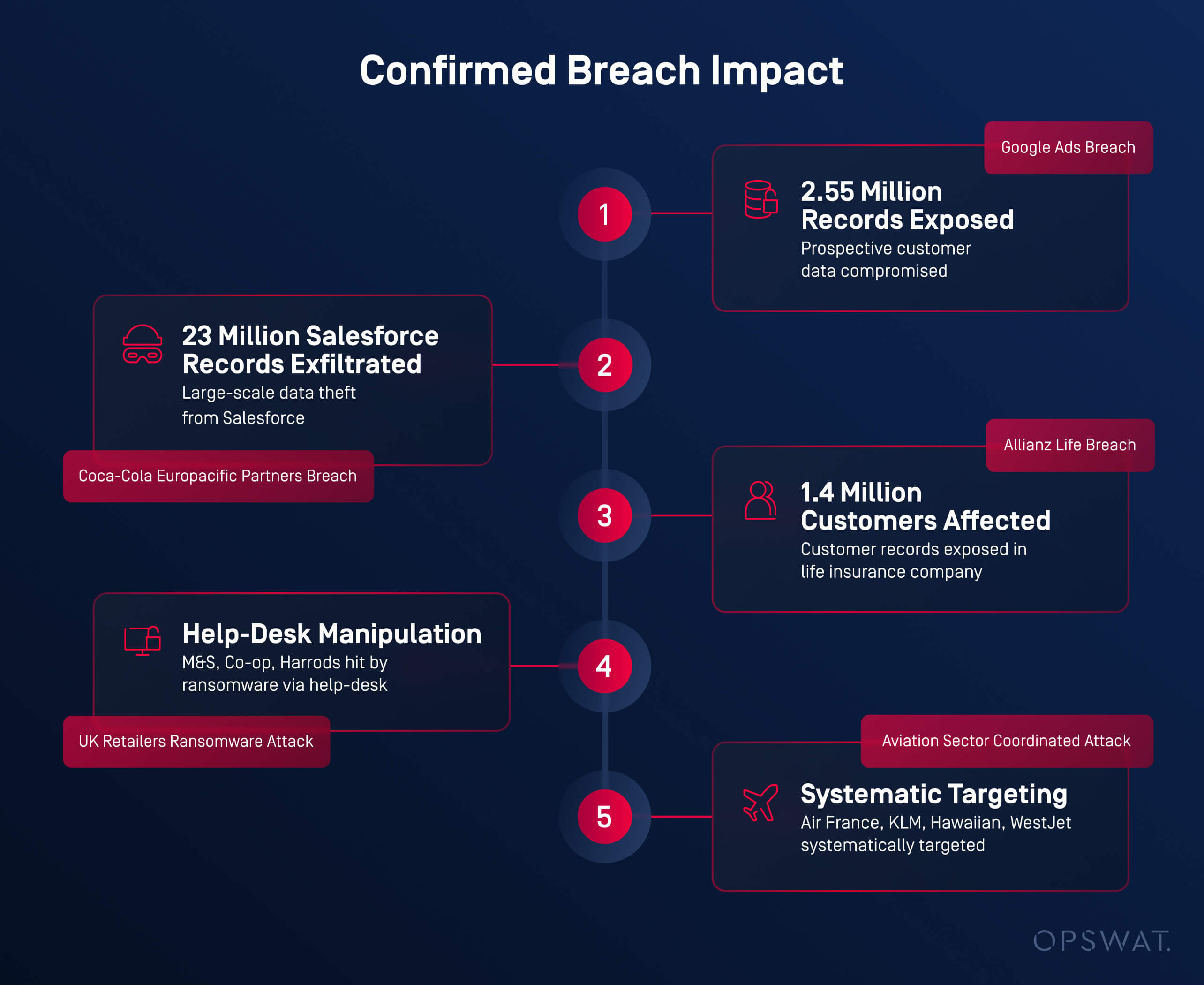
تأثير الانتهاك المؤكد
- إعلانات Google: تعرض 2 .55 مليون سجل لعملاء محتملين
- شركاء Coca-Cola Europacific: تسرب أكثر من 23 مليون سجل من Salesforce
- Allianz Life:1.4 مليون العملاء
- تجار التجزئة في المملكة المتحدة (M&S، Co-op، Harrods): أدى التلاعب بمكتب المساعدة إلى نشر برامج الفدية
- قطاع الطيران (إير فرانس، KLM، هاواي، ويست جيت): استهداف منهجي ومنسق
ظهرت قاسم مشترك بين جميع الحوادث: دخول ملفات وروابط ضارة عبر سير عمل Salesforce الموثوق به؛ دون فحص أو مراقبة.
الملفات كأسلحة: كيف أصبحت المستندات اليومية وسيلة للهجوم
خلال أوائل عام 2025، كشف العديد من محللي قطاع الأمن عن نمط معين.
يستخدم المهاجمونملفات تبدو شرعية لتجاوزالدفاعات التقليدية والوصول إلى المستخدمين النهائيين داخل منصات SaaS مثل Salesforce.
لقد تغير السيناريو.
بدلاً من استغلال نقاط الضعف في البرامج، ركز الخصوم علىتنسيقات المستندات الموثوقةالتي يتم توفيرها من خلال سير العمل العادي للأعمال - عمليات التحميل والسجلات المشتركة وعمليات التكامل.
هذه الطريقة أكثر فعالية، لأن الفحص الأمني غالباً ما يكون ضئيلاً بالنسبة لتحميل الملفات.
أنواع الملفات الأكثر تعرضًا للاستغلال في الهجمات القائمة على SaaS
استغلت عمليات تحميل الملفات المسلحة ثقة المستخدمين، حيث أخفت محتويات ضارة في ملفات يومية.[2-5]
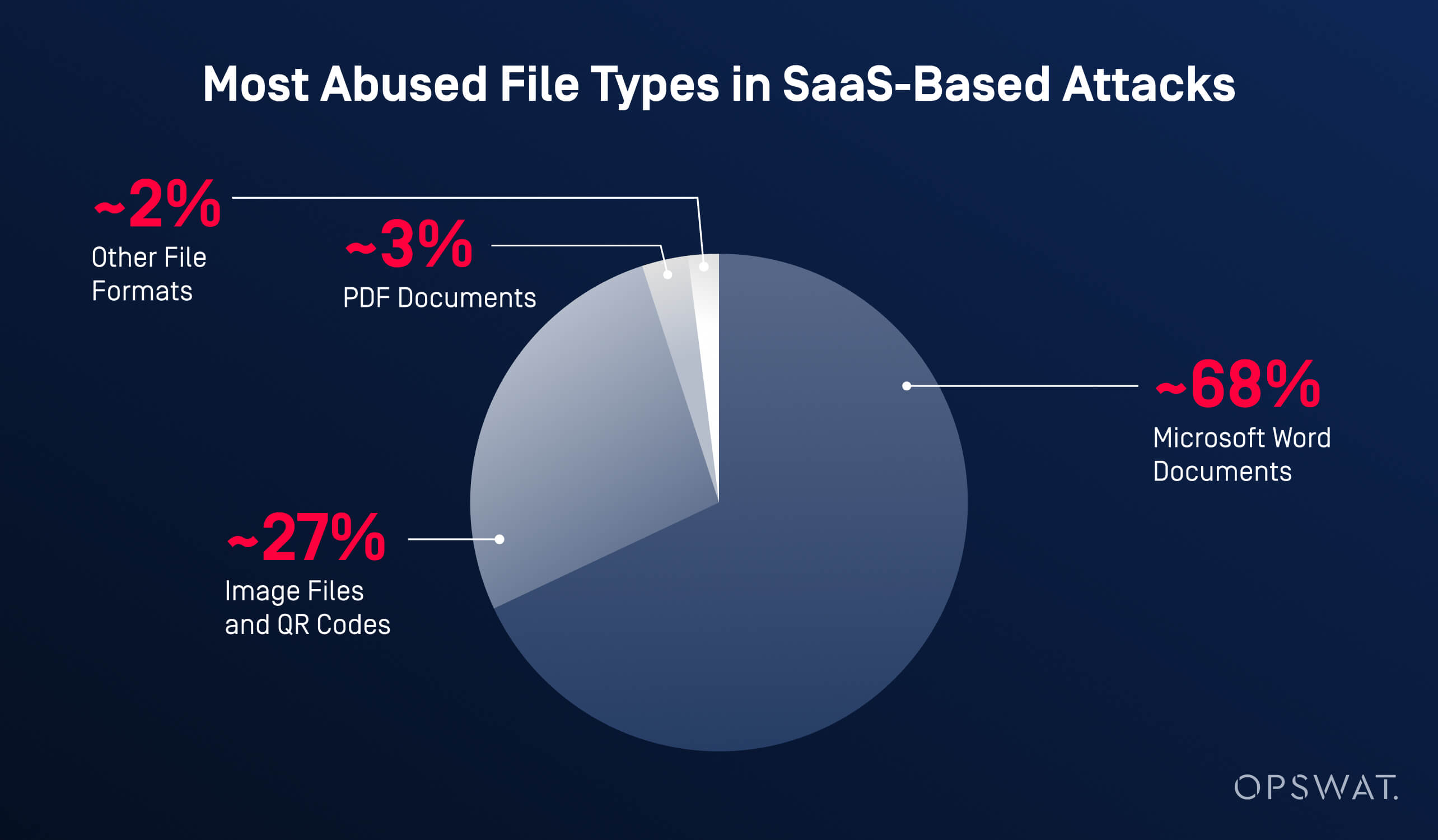
مستندات Microsoft Word (~68٪)
ظلت ملفات Word هي الوسيلة الأكثر شيوعًا لنشر الأنشطة الخبيثة.
قام المهاجمون بتضمين روابط تصيد احتيالي أو عناوين URL خارجية لتنزيل برامج ضارة وربطها برسائل هندسة اجتماعية مقنعة مثل "يرجى مراجعة الفاتورة" أو "مرفق عقد محدث".
بمجرد تحميلها مباشرة إلى Salesforce، تجاوزت هذه الملفات ضوابط أمان البريد الإلكتروني تمامًا.
ملفات الصور ورموز QR (~27٪)
كما تم تسليط الضوء عليه في تقارير التهديدات الصادرة عن Microsoft وغيرها من الشركات في هذا المجال، اكتسبت عمليات التصيد الاحتيالي القائمة على QR ("quishing") زخماً في عام 2025.
أدت رموز QR الضارة المضمنة في ملفات الصور إلى إعادة توجيه المستخدمين، خاصة علىmobile إلى صفحات لجمع بيانات الاعتماد، مستغلة ضعف الرؤية والتفتيش في mobile .
مستندات PDF (~3٪)
عادةً ما يتم إخفاء ملفات PDF على أنها فواتير أو نماذج امتثال أو مستندات قانونية.
بعضها احتوى على جافا سكريبت مدمج، بينما ربط البعض الآخر المستخدمين بمواقع خارجية للتصيد الاحتيالي أو استضافة البرامج الضارة.
تنسيقات ملفات أخرى (~2%)
استغل المهاجمون أيضًا:
- ملفات HTML لصفحات التصيد الاحتيالي المستندة إلى المتصفح
- أرشيفات ZIP لإخفاء الحمولات الثانوية
- ملفات Excel تستخدم تقنيات قائمة على الصيغ لتنفيذ منطق ضار
لماذا ينجح هذا
لم تثير هذه الملفات أي شكوك لأنهابدت شرعية، ومرت عبرسير عمل Salesforce الشرعي، وح ظيتبثقة المستخدمين.
مع قيام المؤسسات بتعزيز أمن الشبكات وبوابات البريد الإلكتروني، تحول المهاجمون ببساطة إلى المسار الأقل مقاومة: الملفات الموثوقة داخل المنصات الموثوقة.
أزمة تطور البرمجيات الخبيثة
مع تزايد تبادل البيانات القائم على الملفات، أصبحت البرامج الضارة أكثر تعقيدًا وصعوبة في الكشف عنها، وغالبًا ما تتجاوز أدوات الأمان التقليدية القائمة على التوقيعات.
وفقًاOPSWAT ارتفعت تعقيدات البرامج الضارة بنسبة127% في ستة أشهر، مدفوعة بالبرامج الضارة متعددة الأشكال التي تتغير مع كل عملية توصيل، والهجمات غير الملفية التي يتم تنفيذها مباشرة في الذاكرة، والحمولات المؤجلة زمنيًا، وتقنيات التهرب من الصندوق الرملي، والمحتوى الضار المشفر المخفي داخل هياكل الملفات المشروعة.
لماذا فشلت الدفاعات التقليدية
- تكتشف محركات مكافحة الفيروسات الفردية50-70% فقط من التهديدات، مما يعني أن30-50% منها تتسلل بشكل روتيني.
تفسر فجوة الكشف هذه السبب:
- 67.72٪ من مستندات Word الضارة تجاوزت الدفاعات
- 26.78٪ من هجمات رموز الاستجابة السريعة تجاوزت ضوابط البريد الإلكتروني ونقاط النهاية
- أصبحت Salesforce آلية توصيل مثالية بمجرد أن تجنب المهاجمون استخدام البريد الإلكتروني تمامًا.
الروابط المخفية داخل الملفات: تكتيكات متقدمة لتفادي عناوين URL
في بعض الهجمات الحديثة، تتجاوز نقطة الحقن الملف نفسه.
في هذه الحالات، غالبًا ما يكون الخطر الحقيقي مخفيًا داخلعناوين URL المضمنة في المستندات والصور.
يذكر باحثو الأمن باستمرار أن المهاجمين يركزون بشكل أقل على توزيع البرامج الضارة، ويركزون بشكل أكبر علىإعادة توجيه المستخدمين إلى وجهات ضارة، باستخدام روابط تبدو شرعية للوهلة الأولى.
بحلول الوقت الذي ينقر فيه المستخدم، تكون عمليات الفحص الأمنية التقليدية قد تم تجاوزها بالفعل.
تقنيات الهجوم الشائعة القائمة على عناوين URL والمستخدمة على نطاق واسع
انتحال العلامة التجارية والنطاقات المشابهة
يقوم المهاجمون بشكل روتيني بتسجيل نطاقات تشبه إلى حد كبير العلامات التجارية الموثوقة، عن طريق استبدال الأحرف أو إضافة أحرف إضافية أو إساءة استخدام النطاقات الفرعية.
ومن الأمثلة على ذلك النسخ التي تحتوي على أخطاء إملائية منالخدمات المعروفة، أو عناوين URL المليئة بأسماء العلامات التجارية الموثوقة لتضليل المستخدمين وجعلهم يعتقدون أنها آمنة.
النطاقات المسجلة حديثًا (NRDs)
تعتمد نسبة كبيرة من حملات التصيد الاحتيالي على نطاقات تم إنشاؤها قبل أسابيع قليلة أو حتى أيام قليلة من الهجوم. لا تتمتع هذه النطاقات بسمعة راسخة، وتُستخدم لفترة وجيزة خلال الحملات، وغالبًا ما يتم التخلي عنها قبل أن يتم وضعها على قوائم الحظر.
إساءة استخدام الخدمات تقصير عناوين URL
الخدمات الروابط المختصرة من الخدمات المستخدمة على نطاق واسع الوجهة النهائية، مما يمنع المستخدمين أدوات الأمان الأساسية أدوات رؤية المكان الذي يقود إليه الرابط. لا تزال هذه التقنية شائعة لأنها تتجنب التصفية البسيطة القائمة على السمعة والكلمات المفتاحية.
إساءة استخدام المنصات الشرعية وإعادة التوجيه
يختبئ المهاجمون بشكل متزايد خلف البنى التحتية الموثوقة مثل عمليات إعادة توجيه محركات البحث أو الخدمات السحابية أو منصات توصيل المحتوى. تبدو عناوين URL هذه حميدة، وتجتاز عمليات التحقق الأولية من الموثوقية، ولا تعيد توجيه المستخدمين إلى صفحات التصيد الاحتيالي أو استضافة البرامج الضارة إلا في وقت لاحق.
نطاقات المستوى الأعلى غير المألوفة أو منخفضة التكلفة (TLDs)
تُستخدم بعض نطاقات TLD بشكل غير متناسب في حملات التصيد الاحتيالي بسبب انخفاض تكاليف التسجيل وتراخي إجراءات الإنفاذ. على الرغم من عدم وجود نطاق TLD ضار بطبيعته، إلا أن المهاجمين يفضلون النطاقات التي يمكن إنشاؤها بسرعة والتخلص منها دون عواقب.
لماذا لا يزال يعمل
يصبح تقييم السمعة الثابت(التحقق مما إذا كان النطاق قد شوهد من قبل أو يظهر في قوائم الحظر المعروفة) عديم الفائدة عندما يقوم المهاجمون بتبديل النطاقات بسرعة، أو إساءة استخدام الخدمات الموثوقة، أو تأخير السلوك الضار حتى بعد التسليم.
تهديدات عناوين URL الحديثة تتطلب أكثر من مجرد فحوصات سطحية.
يعتمد الدفاع الفعال علىتحليل السياق والإشارات السلوكية والتفتيش المستمر.
يلزم إجراء فحص دقيق خاصة داخل منصات SaaS الموثوقة حيث يكون المستخدمون أكثر عرضة للنقر دون تردد.
فهم كامل نطاق هجمات Salesforce
توفر Salesforce العديد من الطرق لتحميل الملفات ومشاركتها وتبادلها - وقد استغل المهاجمون جميع هذه الطرق تقريبًا.
بدلاً من استهداف ميزة واحدة، قاموا بإساءة استخدامنظام استيعاب الملفات بأكمله، ودمجوا محتوى ضارًا في سير العمل اليومي للشركة.
نقاط الدخول الرئيسية المستندة إلى الملفات في Salesforce
قنوات التواصل مع العملاء
كانت مسارات الإرسال الخارجية مستهدفة بشكل متكرر لأنها مصممة لقبول الملفات من مستخدمين غير موثوق بهم. ويشمل ذلك نماذج البريد الإلكتروني إلى الحالة ونماذج الويب إلى الحالة Cloud Service Cloud والتحميلات عبر بوابات العملاء.
التعاون الداخلي أدوات
استغل المهاجمون ميزات التعاون مثل منشورات Chatter والملفات المشتركة والتكامل مع منصات المراسلة مثل Slack و WhatsApp، بالإضافة إلى المحتوى المشترك داخل Cloud Experience Cloud .
واجهات برمجة التطبيقات والتكامل والأتمتة
أدى تدفق البيانات الآلي إلى ظهور مخاطر إضافية. أدوات عمليات استيراد الملفات عبر Data Loader والتطبيقات المتصلة أدوات أتمتة سير العمل التابعة لجهات خارجية بدخول محتوى ضار إلى بيئات Salesforce دون تفاعل مباشر من المستخدم.
لماذا لا تكفي الضوابط الأمنية التقليدية لـ Salesforce
على الرغم من الاستثمارات الضخمة في مجال الأمن السيبراني، لا تزال العديد من المؤسسات معرضة للخطر.
تشير الأبحاث الصناعية، بما في ذلكتقرير Verizon DBIR، إلى أن ما يقرب من68٪ من الحوادث الأمنية تنطوي على أخطاء بشرية، في حين أن معظم أدوات الأمان القديمة أدوات أبدًا لحماية منصات SaaS مثل Salesforce.
المسألة الأساسية هي الرؤية والتوقيت.
تركز الضوابط التقليدية على البريد الإلكتروني أو نقاط النهاية، تاركةً عمليات تحميل الملفات والمحتوى المخزن داخل Salesforce دون فحص إلى حد كبير.
- تتوقف بوابات أمان البريد الإلكتروني عند تسليم البريد الوارد ولا تقوم بمسح الملفات التي يتم تحميلها مباشرة إلى Salesforce.
- يحميEndpoint الأجهزة بدلاً من المنصات السحابية، وعادةً ما يقوم بفحص الملفات بعد تنزيلها فقط.
- توفر CASBs (وسيط أمانCloud ) فحصًا محدودًا للملفات ولا تكتشف في كثير من الأحيان التهديدات المضمنة أو المشفرة.
- الاكتشاف القائم على التوقيع غير فعال ضد هجمات فورية والبرمجيات الخبيثة متعددة الأشكال، مما يجعله غير موثوق به بالنسبة للوثائق الحديثة المسلحة.
مع تزايد استخدام المهاجمين لمنصات SaaS الموثوقة لتوزيع البرامج الضارة والروابط الخبيثة، فإن هذه الثغرات تجعل بيئات Salesforce عرضة للخطر دون وجود أمان مخصص لتحميل الملفات.


كيف يؤمنMetaDefender Salesforce تحميل الملفات
يغلق MetaDefender Salesforceهذه الثغرة الأمنية عن طريق فحص الملفات والروابطفي لحظة دخولها إلى Salesforce.
باستخدامتقنيات أمان الملفات المتقدمةوالمتوافقة مع السحابة، يقوم بتطبيق الفحص العميق مباشرة عند نقطة الدخول؛ قبل تخزين المحتوى أو مشاركته أو معالجته بواسطة سير عمل Salesforce.
من خلال الجمع بين الفحص متعدد الطبقات للبرامج الضارة وتحليل المحتوى وفحص الروابط،MetaDefender البرامج الضارة وروابط التصيد الاحتيالي والتهديدات الخفية في مرحلة مبكرة.
الخلاصة: أمن Salesforce يبدأ بالملفات
توضح بيانات الأمان لعام 2025[6]أمرًا واحدًا: أصبحت الملفات هي الوسيلة الرئيسية للهجوم على منصات SaaS مثل Salesforce. يستخدم المهاجمون بشكل متزايد تحميل الملفات والمحتوى المشترك لتجاوز الدفاعات التقليدية، بينما يسمح إساءة استخدام OAuth للتهديدات بالتسلل عبر ضوابط MFA تمامًا.
في الوقت نفسه، أدوات تصميم عدد قليل من أدوات الأمان القديمة لحماية سير عمل Salesforce أو فحص الملفات عند تحميلها.
للحد من المخاطر بشكل فعال، يجب أن يتم الوقايةقبل وصول الملفات أو الروابط الضارة إلى المستخدمين أو العمليات التجارية.
MetaDefender Salesforce يتيح ذلك بالضبط.
السؤال الحقيقي لم يعد ما إذا كان المهاجمون يستهدفون بيئة Salesforce الخاصة بك، بل ما إذا كنت ستوقفهم قبل أن ينجحوا.
الأسئلة الشائعة: أمان تحميل الملفات في Salesforce
لماذا يمثل تحميل الملفات خطرًا أمنيًا في Salesforce؟
يستخدم المهاجمون بشكل متزايد تحميل الملفات والروابط المضمنة لتجاوز البريد الإلكتروني والدفاعات المحيطة. في عام 2025، أظهرت أبحاث الأمن أن سير عمل Salesforce الموثوق به أصبح نقطة دخول أساسية للبرامج الضارة والتصيد الاحتيالي.
هل يمكن لأمن Salesforce الأصلي إيقاف الملفات الضارة؟
تقوم Salesforce بتأمين المنصة نفسها ولكنها لا تقوم بفحص الملفات التي تم تحميلها أو عناوين URL المضمنة بشكل دقيق. بدون ضوابط إضافية، يمكن أن تدخل التهديدات من خلال المرفقات وواجهات برمجة التطبيقات والتكاملات.
ما هي الملفات الأكثر تعرضًا للاستغلال في هجمات Salesforce؟
غالبًا ما يستغل المهاجمون مستندات Word وملفات الصور التي تحتوي على رموز QR وملفات PDF لأنها تبدو شرعية وتجاوز الضوابط الأمنية التقليدية بسهولة.
كيف يسدMetaDefender Salesforce هذه الفجوة؟
يقوم MetaDefender Salesforce بفحص الملفات والروابط في لحظة دخولها إلى Salesforce، ويحظر البرامج الضارة والتصيد الاحتيالي قبل تخزين المحتوى أو مشاركته أو استخدامه في سير العمل.